Many a times it happens that we need to transpose the Excel data from columns to rows or vice-versa. But no need to search more in Google for this simple trick or no need to use any Macro or any program. Microsoft has kept a very nice option to easily convert rows to columns and vice-versa. Just go through the following instructions.
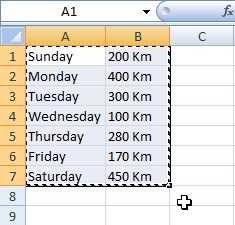
Just select and copy the data from an Excel table as shown in the following figure.
After coping the data, press Ctrl+n to open a new Excel.
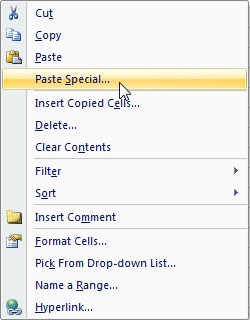
Right click on the new Excel and click on Paste Special
A window will appear where you can find a check box called Transpose at the bottom. Make it checked and click OK.
 Many a times it happens that we need to transpose the Excel data from columns to rows or vice-versa. But no need to search more in Google for this simple trick or no need to use any Macro or any program. Microsoft has kept a very nice option to easily convert rows to columns and vice-versa. Just go through the following instructions.