Are you a Micromax dongle user ? Its very irritating that every time you connect to the internet and a home page of Micromax site opens and it will take 0.5-1 mb memory usage.
As per my concern use of 3G SIM in a dongle is not so cheap. Due to unnecessary use of ~1mb during each net connection makes the user unhappy. Because if you are connecting net 1-2 times in a day it means you are spending 30-40mb net unnecessarily in a month. So I am going to tell you a very easy trick through which you can change the landing page of the dongle to your desired one (Home Page).
Just Follow these easy steps to do it:
- Open My Computer → C: Drive → Program Files → MMX353G 3G USB Manager(I am using this model of Micromax so if you are using any other model search for that folder in Program files)

- In the Micromax folder search for the file UsbModem.ini and open it.
- Then search for the Home page URL as shown in the below image and replace it with your desired one.
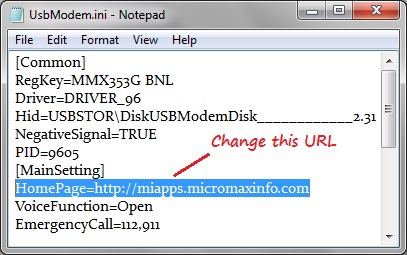
- Finally don't forget to save the file and you are done.
- Disconnect your dongle and close the Micromax software. Now reconnect it & see the magic.
Enjoy Surfing and save unnecessary usage of net.:)
This isn’t working with Micromax MMX310G dongle…:(
Mr Vicky can you tell us the exact problem so that we can try to solve it. 🙂
not working with my mmx 352 model
finally it worked.i forgot to add www.
there is no ‘homepage
in my ‘main setting’
Did you try adding a new line for home page ?
whats your model number?