It is very essential to switch between windows easily & quickly when you are working on a lot of windows simultaneously. There are 4 main methods by which you can switch between windows very quickly.
Method-1
Windows+tab
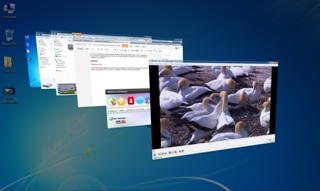
This is the easiest method to switch between windows. Press Windows button first and then keep on pressing Tab. You will see a 3d effect of windows. This is just amazing. When you want to view a particular window just release your Windows button.
Method-2
Ctrl+Windows+Tab
Press Ctrl+Windows+Tab to view the 3d effect just like method 1 but here the effect will persists even if you release your Windows button. Now you can press your up–down key to navigate through different windows. You can also scroll your mouse to quickly switch between windows.
Method-3 (More easier than method-2)
Creating a shortcut for Method-2
- Right click on desktop –> Go to New –> Shortcut
- It will ask you top enter the location. Enter the following as the location. %windir%system32rundll32.exe DwmApi #105
- Click Next and Finish
- Now can double click the shortcut to open 3d view
Method-4
alt+Tab
Press alt+tab to switch between different windows in a 2d view. First press the alt button then keep on pressing tab button. If you want to open a particular window then release your alt button there.

You may also like to see
You may also like to see